Introduction
Picture a customer standing on a Manhattan street corner, tapping a search result for a nearby dentist while the walk signal counts down. The first page takes four seconds to show anything, so she taps back and chooses the next listing instead. That small moment, repeated thousands of times across the city, is exactly why site speed has become a serious business issue.
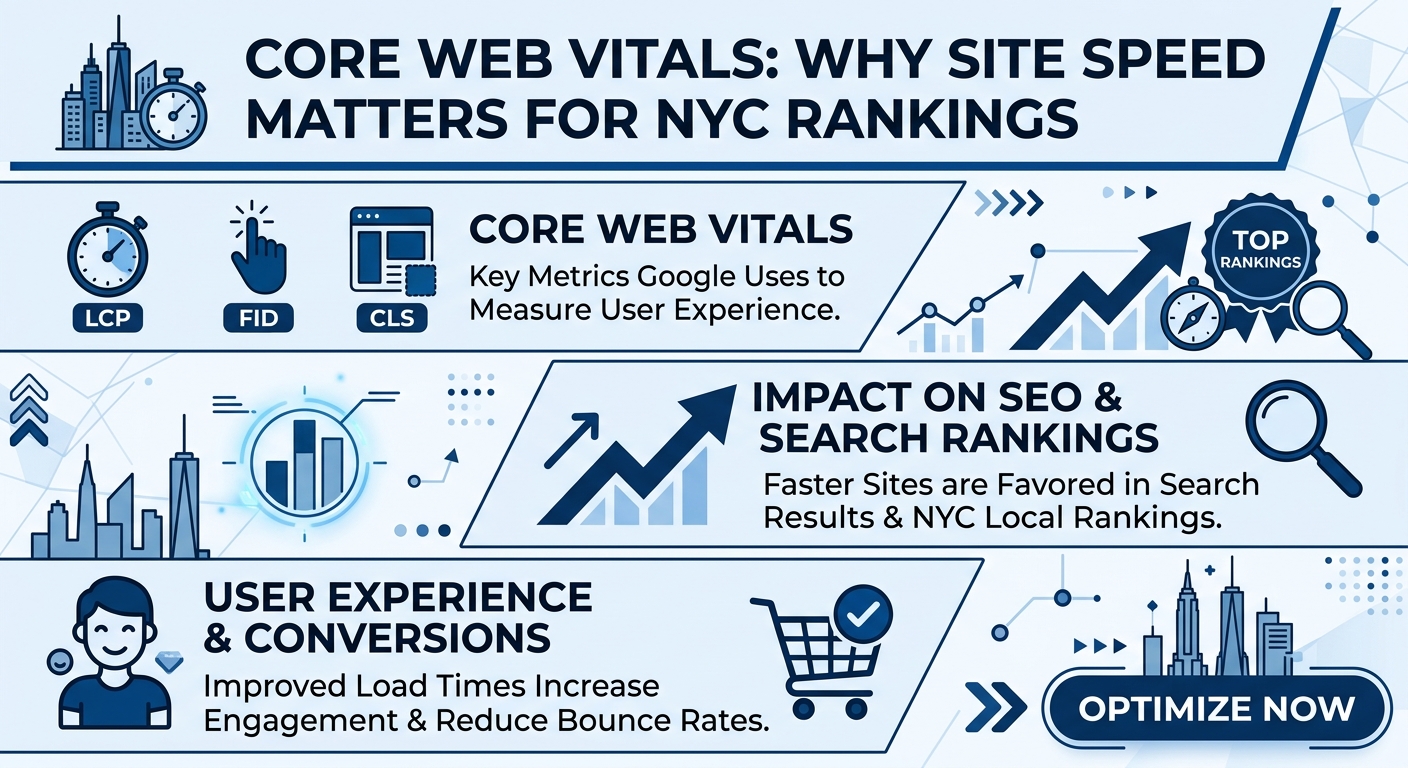
Core Web Vitals are a set of measurements that describe how fast, responsive, and stable a web page feels to real visitors. Search engines use these signals as part of their page experience evaluation, which means a slow or jumpy website can quietly lose ground to faster competitors. For businesses in New York, where almost every service category is crowded, that loss can be expensive.
Speed is no longer a purely technical concern that belongs only to developers. It shapes how customers feel about your brand, how long they stay, and whether they call, book, or buy. A fast website tells visitors that you respect their time, and a slow one tells them to look elsewhere.
This guide explains what Core Web Vitals are and why search engines measure them. It also covers why speed matters so much in a competitive city like New York, how each of the three main metrics works, and how performance connects to rankings, traffic, and revenue. The later parts move into practical fixes, monitoring tools, common mistakes, and where page experience is heading.
What Core Web Vitals Are and Why Google Measures Them
Core Web Vitals are a small group of user focused metrics that capture the most important parts of a page visit. They look at how quickly the main content loads, how fast the page reacts to a tap or click, and how steady the layout stays while everything appears. Together they turn a vague feeling of “this site is slow” into numbers that can be measured and improved.
Search engines measure these signals because their goal is to send people to pages that are genuinely pleasant to use. A result that ranks well but frustrates visitors reflects poorly on the search experience itself. By including real world performance data in their evaluation, search engines reward sites that treat visitors well.
Several features make these metrics especially practical for business owners:
- They are based on data from real visitors using real devices and connections, not only lab simulations.
- They focus on experiences that visitors actually notice, such as waiting, delays, and sudden movement.
- They come with clear targets, so you know when a page is considered good, needs improvement, or is poor.
- They can be checked for individual pages as well as for an entire website.
- They apply to both mobile and desktop visits, although mobile results usually matter more for local businesses.
It helps to remember that Core Web Vitals are one signal among many. Relevant content, strong authority, and helpful information still carry great weight in rankings. However, when two pages are similar in quality, a better page experience can be the detail that tips the result in your favor.
Why Site Speed Matters in a Competitive City Like New York
New York may be the most competitive local market in the country, with hundreds of similar businesses often sitting within walking distance of one another. Customers can compare options in seconds, and they rarely feel loyalty to a website that makes them wait. In this environment, a delay of even a second or two can decide who receives the call.
The lifestyle of the city also raises the stakes. People search while commuting underground, walking between meetings, and waiting in lines, often on a crowded cellular network that is far from ideal. A page that loads comfortably on office Wi-Fi may feel painfully slow in a subway station or a busy street.
Several factors make speed especially valuable for NYC businesses:
- Customers have countless alternatives nearby, so patience is limited.
- Many searches carry urgent intent, such as repairs, medical care, legal help, and same day bookings.
- Mobile use is extremely high, and mobile networks can be inconsistent in dense areas.
- Tourists and newcomers judge businesses quickly because they have no prior loyalty.
- Advertising costs in the city are high, so wasting paid clicks on slow pages is costly.
There is also a trust element that is easy to overlook. A fast, smooth website feels professional and reliable, while a sluggish one raises doubts about the business behind it. In industries such as law, healthcare, finance, and home services, that first impression can influence whether a visitor ever makes contact.
Understanding the Three Core Web Vitals
The three main Core Web Vitals each describe a different part of the visitor experience. One focuses on loading, one on interactivity, and one on visual stability. Understanding what each one measures makes it much easier to find and fix the real causes of a slow or frustrating page.
Largest Contentful Paint measures how long it takes for the biggest visible element, such as a hero image or main headline, to appear. Interaction to Next Paint measures how quickly the page responds after a visitor taps, clicks, or types. Cumulative Layout Shift measures how much the content jumps around while the page is loading.
| Core Web Vital | What It Measures | Good Target | Needs Improvement | Poor |
|---|---|---|---|---|
| Largest Contentful Paint | Time for the main content to appear | 2.5 seconds or less | 2.5 to 4 seconds | Over 4 seconds |
| Interaction to Next Paint | Time for the page to respond to input | 200 milliseconds or less | 200 to 500 milliseconds | Over 500 milliseconds |
| Cumulative Layout Shift | Amount of unexpected layout movement | 0.1 or less | 0.1 to 0.25 | Over 0.25 |
Targets are usually assessed at the seventy fifth percentile of real visits, which means most of your visitors should enjoy a good experience rather than just a lucky few. This is why a site can look fast on your own device yet still fail the assessment for the wider audience. Visitors on older phones and slower connections often pull the numbers down.
Each metric also tells a story about what visitors feel. A slow loading score feels like waiting at a closed door, a weak responsiveness score feels like tapping a button that does nothing, and a poor stability score feels like trying to click something that keeps moving away. Fixing these feelings is what turns performance work into better customer experiences.
How Speed Affects Rankings, Traffic and Revenue
Speed influences results through several connected paths. First, page experience signals contribute directly to how search engines evaluate your pages. Second, faster pages are crawled more efficiently, which helps new and updated content get discovered sooner.
The indirect effects are often even larger than the direct ones. Visitors who find a page fast and easy to use stay longer, view more pages, and are more likely to take action. Those behaviors send positive signals and also produce real business results such as calls, bookings, and sales.
The connection between speed and outcomes can be summarized in a simple chain:
- A fast page loads before the visitor loses patience, which reduces early exits.
- A responsive page reacts instantly to taps, which keeps visitors moving toward action.
- A stable page avoids accidental clicks, which prevents frustration and lost trust.
- A smooth experience encourages longer visits, more page views, and higher conversion rates.
- Better engagement and conversions support stronger overall performance in search.
Revenue is where the effect becomes easiest to see. A bakery, clinic, or law firm that improves its loading time often notices more phone calls, more form submissions, and fewer abandoned visits. Even small improvements can add up when applied to hundreds or thousands of monthly visitors.
Paid campaigns benefit as well, because faster landing pages usually convert better and can lower the cost of each lead. Since many NYC businesses invest heavily in advertising, improving speed can make every marketing dollar work harder. The next part explains how to improve each Core Web Vital step by step, along with the image, hosting, and mobile strategies that make the biggest difference.

Largest Contentful Paint and How to Improve It
Largest Contentful Paint reflects how long a visitor waits before the main part of your page becomes visible. On most business websites, that main element is a large hero image, a banner, or a big block of headline text. If it appears quickly, the page feels fast, and if it lingers, visitors begin to doubt whether the site is working.
Several common problems slow this metric down. Oversized images, slow server responses, heavy scripts that block the page, and large style files all delay the moment the main content appears. Identifying which of these is the real cause is the first step toward a meaningful fix.
Practical ways to improve loading time include the following:
- Compress and resize the hero image so it is no larger than the space it actually fills.
- Use modern image formats that deliver good quality at much smaller file sizes.
- Load the main image and key fonts with priority so the browser fetches them first.
- Reduce the amount of code that must load before the page can display anything.
- Improve server response time with quality hosting and efficient page generation.
Avoid placing the main image inside a slider or a script driven carousel when possible. These features often delay the visible content because the browser must run extra code before showing the first picture. A simple, static hero section usually loads faster and still looks professional.
Interaction to Next Paint and Responsive Pages
Interaction to Next Paint measures how quickly your page responds after a visitor taps a button, opens a menu, or types into a form. A strong score means the page reacts almost instantly, while a weak score creates that frustrating moment when nothing seems to happen. For mobile visitors in New York who are often multitasking, that delay can end the visit.
The most frequent cause of poor responsiveness is too much work happening in the browser at once. Large script files, third party tools, chat widgets, tracking codes, and heavy animations all compete for the same limited processing power. On older phones, this competition becomes even more noticeable.
To improve responsiveness, consider these steps:
- Remove plugins, widgets, and tracking tools that you no longer use or need.
- Delay nonessential scripts until after the page becomes usable.
- Break long tasks into smaller pieces so the browser can respond to taps between them.
- Simplify menus, sliders, and animated features that require heavy processing.
- Test interactions such as opening menus, submitting forms, and tapping buttons on real phones.
Third party tools deserve special attention because they are easy to add and easy to forget. Each new script may seem small, but together they can slow a site dramatically. Review them regularly and keep only the ones that clearly support your business goals.
Cumulative Layout Shift and Visual Stability
Cumulative Layout Shift tracks how much the page moves unexpectedly while it loads or while visitors interact with it. Everyone has experienced the annoyance of trying to tap a link just as an image loads and pushes the button out of reach. These accidental clicks damage trust and often cause visitors to leave.
Layout shifts usually happen when elements load without reserved space. Images with no set dimensions, ads that appear late, embedded videos, cookie banners, and fonts that swap after loading can all push content around. Preventing these shifts is often simpler than people expect.
Helpful ways to keep your layout steady include:
- Set width and height values for every image and video so space is reserved in advance.
- Reserve a fixed area for banners, ads, and embedded widgets before they load.
- Place cookie notices and promotional bars in a way that does not push content down.
- Choose font loading methods that avoid sudden changes in text size and spacing.
- Avoid inserting new content above existing content unless the visitor requests it.
A stable page feels calm and professional. Visitors can read, scroll, and tap with confidence because nothing surprises them. This quiet reliability supports both conversions and the overall impression of your brand.
Image, Font and Code Optimization
Images are usually the largest files on a website, which makes them the best place to start when you want a faster page. A single uncompressed photo from a modern phone camera can be several times larger than a whole optimized page should be. Reducing image weight often delivers the biggest improvement for the least effort.
The table below summarizes common optimization areas and the benefits they bring.
| Area | Common Problem | Recommended Fix | Main Benefit |
|---|---|---|---|
| Images | Oversized files and old formats | Compress, resize, and use modern formats | Faster loading and lower data use |
| Lazy Loading | Every image loads at once | Load images only when visitors scroll to them | Quicker first view of the page |
| Fonts | Many font styles and slow loading | Limit font families and preload key files | Less delay and fewer layout shifts |
| CSS Files | Large style files that block display | Remove unused styles and combine files | Faster first display |
| JavaScript | Heavy scripts that delay interaction | Minify, defer, and remove unused code | Better responsiveness |
| Video | Autoplay clips that weigh down pages | Use compressed clips or load on demand | Smoother mobile experience |
Fonts are another quiet source of slowdown. Using several font families and many weights multiplies the files that visitors must download. Choosing one or two fonts, limiting the styles, and loading them efficiently keeps pages light and stable.
Code cleanup matters too. Over time, websites collect unused styles, outdated scripts, and leftover features from old campaigns. A regular cleanup removes this dead weight and keeps the site lean.
A few simple habits make optimization sustainable:
- Set a size limit for images before they are uploaded to the site.
- Use automatic compression tools so editors do not need technical skills.
- Review the list of scripts and plugins every quarter.
- Test new pages for speed before publishing them.
- Keep a record of changes so you can spot what caused any slowdown.
Hosting, Caching and Content Delivery for NYC Visitors
Your hosting setup forms the foundation of speed. Even a perfectly optimized page will feel slow if the server takes too long to respond. For businesses serving New York customers, choosing hosting with fast response times and servers located near the region can make a noticeable difference.
Cheap shared hosting is a common cause of slow performance, especially during busy periods when many sites compete for the same resources. Upgrading to a quality managed or cloud plan often improves response times and reliability. This investment usually pays for itself through better conversions and fewer lost visitors.
Caching is the next layer of improvement. It stores ready made copies of your pages so the server does not have to rebuild them for every visit. Returning visitors also benefit when their browsers keep files locally, which makes repeat visits feel almost instant.
Key infrastructure improvements to consider include:
- Choose hosting with strong uptime and fast server response for the Northeast region.
- Enable page caching and browser caching to reduce repeated work.
- Use a content delivery network so files load from a location close to each visitor.
- Keep your website platform, themes, and plugins updated for performance and security.
- Monitor server health so you can fix problems before visitors notice them.
A content delivery network is especially helpful for sites with many images or visitors from different places. It distributes copies of your files across many locations, reducing the distance data must travel. Tourists and out of town visitors who research New York businesses from afar benefit from this as well.
Mobile Performance on Cellular Networks
Most local searches in New York happen on phones, and phone connections vary widely across the city. A visitor may move from strong signal to a weak one in seconds, especially in subways, tall buildings, and crowded areas. Testing only on fast office networks can give a misleading picture of what customers really experience.
Mobile devices also have less processing power than desktop computers, so heavy pages hit them harder. A script that runs smoothly on a laptop may make a mid range phone stutter. Designing for the typical customer device, rather than the newest one, protects your performance where it matters most.
To strengthen mobile speed, focus on these priorities:
- Keep the first screen light by loading only what visitors need to see immediately.
- Use responsive images that deliver smaller files to smaller screens.
- Limit pop ups, chat tools, and animated effects that strain phones.
- Make buttons and links large and responsive so taps register right away.
- Test regularly on real devices using a cellular connection rather than office Wi-Fi.
Simplicity is a powerful strategy on mobile. Clean layouts, concise content, and fewer moving parts reduce loading time and make pages easier to use.

Tools and Metrics for Monitoring Core Web Vitals
Monitoring Core Web Vitals is not a one time task but an ongoing habit. Pages change, new plugins appear, and images get added, so a site that passed last month can slip without anyone noticing. Regular checks help you catch problems early and prove that your improvements are working.
It is important to understand the difference between lab data and field data. Lab tools simulate a visit under controlled conditions, which is excellent for diagnosing problems and testing fixes. Field data comes from real visitors over time, which shows what your actual customers experience on their own phones and connections.
| Tool Type | What It Provides | Best Use |
|---|---|---|
| Search Performance Reports | Core Web Vitals status grouped by page type using real visitor data | Spotting which groups of pages need attention |
| Page Speed Testing Tools | Lab scores plus real visitor data for a single page | Diagnosing specific problems on key pages |
| Browser Developer Tools | Detailed breakdown of loading, scripts, and layout shifts | Finding the exact cause of slowdowns |
| Real User Monitoring | Ongoing performance data from your own visitors | Tracking trends across devices and locations |
| Website Analytics | Bounce rate, session length, and conversion behavior | Connecting speed to business results |
| Uptime and Server Monitors | Server response and availability alerts | Catching hosting problems quickly |
Review your results monthly and compare them against the targets for each metric. Focus first on your most valuable pages, such as the homepage, service pages, and contact or booking pages. Keep a simple log of every change so you can connect improvements to results.
Common Speed Mistakes NYC Businesses Make
Most speed problems come from small decisions that seem harmless on their own. Over time they add up, and the site becomes heavy without anyone noticing. The most frequent mistakes are listed below:
- Uploading huge, uncompressed images directly from a camera or phone.
- Installing too many plugins, widgets, and tracking tools without reviewing them.
- Choosing cheap hosting that slows down during busy periods.
- Testing only on fast office Wi-Fi instead of real mobile connections.
- Ignoring layout shifts caused by ads, banners, and images without set dimensions.
- Relying on heavy sliders, autoplay videos, and animations on the first screen.
- Fixing speed once and never checking performance again.
Another costly error is chasing a perfect score instead of a better customer experience. A page can show an impressive number in one tool and still feel clumsy to real visitors. Always combine test scores with real world checks and conversion data.
A final mistake is treating speed as separate from content and design. Pages that are clear, well organized, and purposeful tend to be lighter and easier to optimize. Planning for performance from the start is far cheaper than repairing a bloated site later.
The Future of Page Experience and Site Speed
Page experience standards will keep evolving as devices, networks, and visitor expectations change. Search engines have already updated their responsiveness metric, and further refinements are likely as they learn more about what frustrates people. Businesses that build a habit of measuring and improving will adapt more easily than those who treat speed as a one time project.
Faster networks will not remove the need for optimization. As connections improve, designers tend to add richer media and more features, which can offset the gains. Visitors will also grow more demanding, making slow pages feel even less acceptable than they do today.
AI driven search and answer features add another reason to stay sharp. Systems that choose which sources to feature often favor sites that are technically healthy, trustworthy, and easy to process. A fast, stable, well structured website supports visibility in both traditional results and newer search experiences.
Why Choose Dealmate
Dealmate helps New York businesses turn site speed into a real competitive advantage. Our team combines technical SEO knowledge with practical experience in performance optimization, mobile usability, and conversion focused design. Every plan is shaped around your website, your audience, and your business goals.
We keep the process clear and transparent so you always know what is being improved and why it matters. Here is what you can expect when working with Dealmate:
- A detailed Core Web Vitals audit covering loading, responsiveness, and visual stability.
- Image, code, and font optimization that reduces page weight without hurting quality.
- Hosting, caching, and content delivery recommendations suited to New York audiences.
- Mobile testing on real devices and cellular connections.
- Clear monthly reports that connect performance gains to calls, leads, and sales.
Frequently Asked Questions
What are Core Web Vitals?
Core Web Vitals are three measurements that describe how fast, responsive, and stable a page feels. They cover loading, interaction, and visual stability. Search engines use them as part of their page experience evaluation. Improving them benefits both rankings and visitor satisfaction.
Do Core Web Vitals really affect rankings?
Yes, they are one of many signals that search engines consider. Content relevance and authority still carry great weight. However, when pages are similar in quality, better performance can provide an edge. The indirect benefits through engagement and conversions are often even more valuable.
What is a good Largest Contentful Paint score?
A good score is 2.5 seconds or less for the main content to appear. Scores between 2.5 and 4 seconds need improvement, and anything above 4 seconds is considered poor. Compressing images and improving server response are common fixes. Test on mobile connections to see what customers truly experience.
What is Interaction to Next Paint?
It measures how quickly a page responds after a visitor taps, clicks, or types. A good score is 200 milliseconds or less. Heavy scripts and third party tools are the usual causes of poor results. Removing unnecessary code and delaying nonessential scripts can help.
What causes layout shifts on a website?
Layout shifts happen when elements load without reserved space and push other content around. Images without dimensions, late loading ads, banners, and font swaps are common causes. The result is accidental taps and frustrated visitors. Setting fixed sizes for media and embeds usually solves the problem.
Why is site speed so important in New York?
The city has intense competition, with many similar businesses close together. Customers search on the move, often on crowded cellular networks. A slow page gives them an easy reason to choose a competitor. Fast pages capture urgent, high intent visitors before they leave.
How can I check my Core Web Vitals?
Use your search performance reports for real visitor data across page groups. Page speed testing tools provide scores and suggestions for individual pages. Browser developer tools help you find exact causes. Checking monthly keeps you ahead of problems.
Does hosting affect Core Web Vitals?
Yes, slow servers delay everything that follows, especially loading time. Quality hosting with fast response times improves the foundation of your site. Caching and a content delivery network add further gains. Upgrading from cheap shared hosting often brings noticeable results.
How often should I test my website speed?
Check key pages at least once a month and after any major change. New plugins, images, or features can slow a site without warning. Regular testing helps you connect changes to results. A quarterly deeper audit keeps long term performance healthy.
How long does it take to see results from speed improvements?
Visitors often feel the benefits as soon as fixes go live. Reports based on real visitor data usually take several weeks to reflect changes. Ranking and conversion effects build gradually over a few months. Consistent monitoring and steady improvements deliver the most lasting gains.
Conclusion
Core Web Vitals turn the feeling of a fast website into measurable goals, and in a competitive market like New York those goals matter. Fast, responsive, and stable pages earn visitor trust, support stronger search performance, and convert more customers. Businesses that treat speed as a core part of their strategy gain an advantage that competitors find hard to copy.
The path forward is to measure honestly, fix the biggest problems first, and keep monitoring as your site grows. Focus on images, scripts, hosting, and mobile experience, and always test on real devices.