
WordPress SEO optimization usually breaks down because the work is scattered, not because one setting is missing. Many site owners install a plugin, tweak a few titles, and expect movement, but flat rankings usually come from a stack of smaller problems that compound over time.
A green light in an SEO plugin does not mean the page deserves to rank. The pages that improve most are usually the ones with clearer targeting, stronger internal links, cleaner indexing rules, and fewer conflicting plugins. If you want a broader baseline before making changes, start with our practical guide for DIY site owners.
What WordPress SEO optimization really means
WordPress SEO optimization means making it easier for search engines to crawl the right pages, understand what each page is about, and see which pages matter most on your site. It is not a hunt for perfect plugin scores. It is a prioritization process.
On WordPress, the biggest gains usually come from four areas: indexing control, page targeting, internal linking, and technical simplicity. WordPress is flexible, which is useful, but that same flexibility makes it easy to create thin archives, duplicate URLs, and plugin conflicts without realizing it.
Google recommends descriptive, concise title text and warns against keyword stuffing and repetitive boilerplate. Google also recommends crawlable HTML links with descriptive anchor text so pages can be discovered and understood more reliably. Those basics matter more than most site owners think.
Start with visibility blockers before page polish
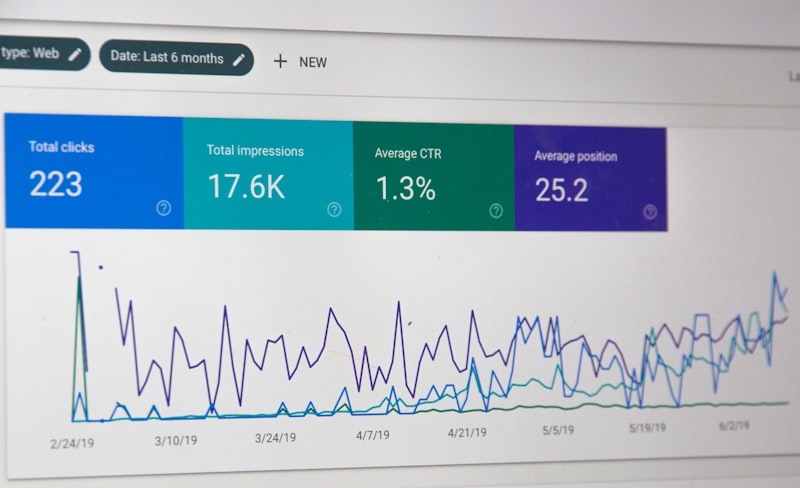
The fastest way to improve WordPress SEO is to fix the issues that block visibility before the issues that polish visibility. If search engines cannot crawl the right pages, index them correctly, or follow your internal links, better copy alone will not solve the problem.
This is where many DIY efforts get derailed. Site owners spend hours rewriting meta descriptions while key pages are weakly linked, archive pages are cluttering indexation, or two SEO plugins are outputting overlapping metadata. If your setup feels messy, our guide on how to fix WordPress SEO setup problems is a strong next step.
| Priority | What to review first | Why it matters |
|---|---|---|
| 1 | Indexing and crawl access | Pages cannot rank if search engines cannot reach or index them properly |
| 2 | Plugin conflicts | Duplicate metadata and sitemap conflicts can affect the whole site |
| 3 | Titles and page targeting | Clear relevance helps search engines match pages to queries |
| 4 | Internal linking | Supports discovery, hierarchy, and topical relationships |
| 5 | Speed and cleanup | Improves usability and reduces technical drag |
Optimize titles for clarity, not keyword stuffing

Title tags are one of the highest-impact on-page elements you control. The goal is not to cram every variation into the title. The goal is to make the page topic obvious, specific, and easy to click.
Google’s guidance is clear on the direction: write descriptive, concise titles and avoid repeated or boilerplate text across pages. That is why broad, stuffed titles tend to underperform compared with titles that match one clear intent.
| Weak title | Stronger title |
|---|---|
| SEO Services | SEO Company | SEO Expert | WordPress SEO Services for Small Businesses |
| Blog | WordPress SEO Tips for Local Service Sites |
| Home | WordPress SEO Consultant for Growing Businesses |
Your page title should reflect the real purpose of the page. If the page is trying to do too many jobs at once, title writing becomes hard for a reason. Usually the page itself needs clearer targeting.
Use one SEO plugin and configure it well
One well-configured SEO plugin is enough for most WordPress sites. Running overlapping SEO plugins often creates duplicate metadata, conflicting canonicals, and competing sitemap outputs that make troubleshooting harder than it needs to be.
This is especially common on sites that have changed owners, gone through redesigns, or added new tools without removing old ones. Simplicity is a competitive advantage here. A cleaner setup usually sends clearer signals than a feature-heavy stack.
Keep one primary plugin, then use it to manage titles, descriptions, schema defaults, social previews, and archive settings. Do not keep adding tools just because one score is yellow instead of green.
Clean up indexing and archive settings
WordPress often creates more indexable URLs than a site actually needs. That does not always cause a disaster, but it often creates confusion. Most site owners do not have one catastrophic problem. They have a stack of smaller issues that dilute focus over time.
Review whether your tag archives, author archives, date archives, attachment pages, and search result pages should be indexed. If those pages are thin, repetitive, or not useful as landing pages, they usually should not compete with your core content.
The goal is straightforward: let search engines spend more attention on your service pages, product pages, core categories, and strongest articles. Thin archive clutter rarely helps a small or midsize WordPress site.
Internal links are one of the biggest missed gains
Internal linking is one of the most underused WordPress SEO tactics because it looks simple. In practice, it helps search engines discover pages, understand context, and see which pages deserve more weight inside the site structure.
Google recommends anchor text that is descriptive and reasonably concise. That matters because vague anchors give weaker context, while descriptive anchors help connect supporting articles to the pages you actually want to rank.
A practical approach is to link broad educational posts to relevant service pages, connect closely related blog posts to each other, and make sure every important page has links from other crawlable pages. If you are experiencing these symptoms, our team at WordPress SEO Expert can help.
Do not overrate meta descriptions and schema
Meta descriptions and schema matter, but they are support layers, not rescue tools. A strong description can improve how a page is summarized in search, and accurate structured data can help search engines understand visible content more clearly. Neither one fixes weak targeting or indexing problems.
Google says it may use the meta description when it gives a more accurate summary of the page. Google also says structured data should represent the main visible content and should not be misleading. That means clean, relevant implementation usually beats turning on every available feature.
Use these elements to support pages that are already useful and technically accessible. Do not treat them as shortcuts around bigger structural issues.
What good WordPress SEO optimization looks like
Good WordPress SEO optimization is usually boring in the best way. The site is crawlable. Important pages are easy to find. Titles are specific. Internal links make sense. Archive settings are controlled. One plugin handles the essentials without overlap.
You do not need a perfect score. You need a site that loads cleanly, is easy to use, and sends consistent signals about which pages matter most. That is what creates momentum over time.
When to get outside help
If rankings are flat and you are not sure whether the real problem is indexing, duplication, weak targeting, or plugin clutter, guessing usually makes the setup messier. A diagnostic review can save weeks of scattered edits.
WordPress SEO Expert can help you sort the technical problems from the content problems before you change anything major. Book a free SEO consultation. No pitch, no pressure. Just an honest look at what your site actually needs and whether your current setup is part of the solution or part of the problem.
Contact WordPress SEO Expert today to schedule a consultation if you want a practical plan for improving your WordPress SEO without adding more confusion to the stack.

















