
Low rankings usually come from a stack of small issues, not one missing plugin. If you want to improve WordPress SEO without coding, focus on the parts you can control from the dashboard first: page titles, internal links, search intent, image handling, site speed, and plugin settings. That is where most non-technical wins live.
You do not need to edit PHP files or write schema by hand to make meaningful progress. Most WordPress sites improve when the basics are cleaner, the page targets are clearer, and the site stops sending mixed signals to Google. If you want a second set of eyes before changing settings, review our WordPress SEO strategy for small business and WordPress site speed for SEO guides.
What to fix first
Start with page-level clarity before you touch advanced tools. A simple order works best: make sure each important page targets one topic, write stronger titles and descriptions, improve headings and copy, add internal links, then clean up images and speed. This prevents busywork that looks productive but changes nothing.
| Priority | What to check | Why it matters |
|---|---|---|
| 1 | One main keyword or topic per page | Helps search engines understand what the page should rank for |
| 2 | Title tag and meta description | Improves relevance and can help click-through rate |
| 3 | Headings and on-page copy | Makes the page easier to scan and more complete for the reader |
| 4 | Internal links | Helps users and Google find related pages and understand site structure |
| 5 | Images, speed, and mobile usability | Improves usability and removes technical friction |
Use one SEO plugin, not a stack

The easiest no-code mistake to fix is plugin overlap. Running multiple SEO plugins, schema plugins, redirect plugins, and snippet tools often creates duplicate settings and conflicting output. One clean setup is usually better than a pile of overlapping tools.
Pick one main SEO plugin and learn it well. Use it to control titles, meta descriptions, XML sitemaps, redirects if available, and social previews. The goal is not to get every traffic light green. The goal is to publish pages that are clear, useful, and technically clean.
Write better titles and meta descriptions

Titles and descriptions are among the highest-impact no-code changes because you can edit them in a plugin field and publish immediately. Google recommends titles that are unique, clear, concise, and accurate, and it warns against repetitive wording and keyword stuffing. Google may also use your meta description for the snippet when it better describes the page.
Weak title: SEO Services | SEO Company | SEO Expert
Stronger title: WordPress SEO Services for Small Businesses
Weak meta description: We offer many SEO services for all kinds of businesses and websites.
Stronger meta description: WordPress SEO services for small businesses. See what we fix first, how we prioritize issues, and where rankings usually get stuck.
Keep titles focused on the page’s real topic. Then write a description that previews the benefit of clicking. This aligns with Google’s guidance on clear, concise title links and helpful meta descriptions.
Match one page to one intent
Many WordPress sites do not have a plugin problem. They have a targeting problem. If one page tries to rank for three different services, or five blog posts chase the same phrase, Google gets mixed signals about which page matters most.
Give each important page one clear job. Your homepage should target your broad service or brand topic. Service pages should target specific buyer-intent searches. Blog posts should answer supporting questions and link back to the relevant service page. If your current pages overlap, consolidate them instead of publishing more content.
Improve headings and copy in the editor
You can improve relevance and usability without touching code by cleaning up the page structure inside the block editor. A clear H1, logical H2s, and copy that answers the next obvious question make a page easier for both readers and search engines to understand.
Start each page with a direct answer to the searcher’s problem. Then break the page into sections that explain process, pricing approach, timeline, who the service is for, and what happens next. This usually does more for rankings than adding another plugin feature.
A simple page upgrade checklist
Use short paragraphs, descriptive subheadings, and plain language. Replace vague claims with specifics you can support. Add examples, objections, and next steps. If a reader lands on the page, they should not have to hunt for what you do, who it is for, or how to contact you.
Add internal links on purpose
Internal linking is one of the best no-code SEO improvements because it strengthens site structure and helps important pages get discovered. Google recommends using descriptive anchor text and linking to helpful related pages in context so users and search engines can make better sense of your site.
When you update a blog post, link naturally to the next useful page. For example, a strategy article can point readers to your guide on improving WordPress site speed for SEO, while a technical article can link back to your small business WordPress SEO strategy. Descriptive anchor text works better than generic phrases because it tells readers what they will get.
Google’s documentation on internal links and anchor text is worth following closely here. Most site owners already have pages worth linking to. They just have not connected them.
Fix images without code
Large, messy images quietly drag down WordPress SEO because they slow the page and create a worse mobile experience. You can fix most of this from plugins and the media library without editing templates or server files.
Upload images at sensible dimensions, compress them with a reputable image optimization plugin, and write alt text that describes the image when it adds context. Google uses alt text along with page content to understand images, and WordPress has supported native lazy loading for images since WordPress 5.5. That means many sites can improve image handling with settings, not custom code.
If images are a bottleneck, our guide on real WordPress speed fixes for SEO walks through the practical order for compression, lazy loading, and caching.
Use Search Console before guessing
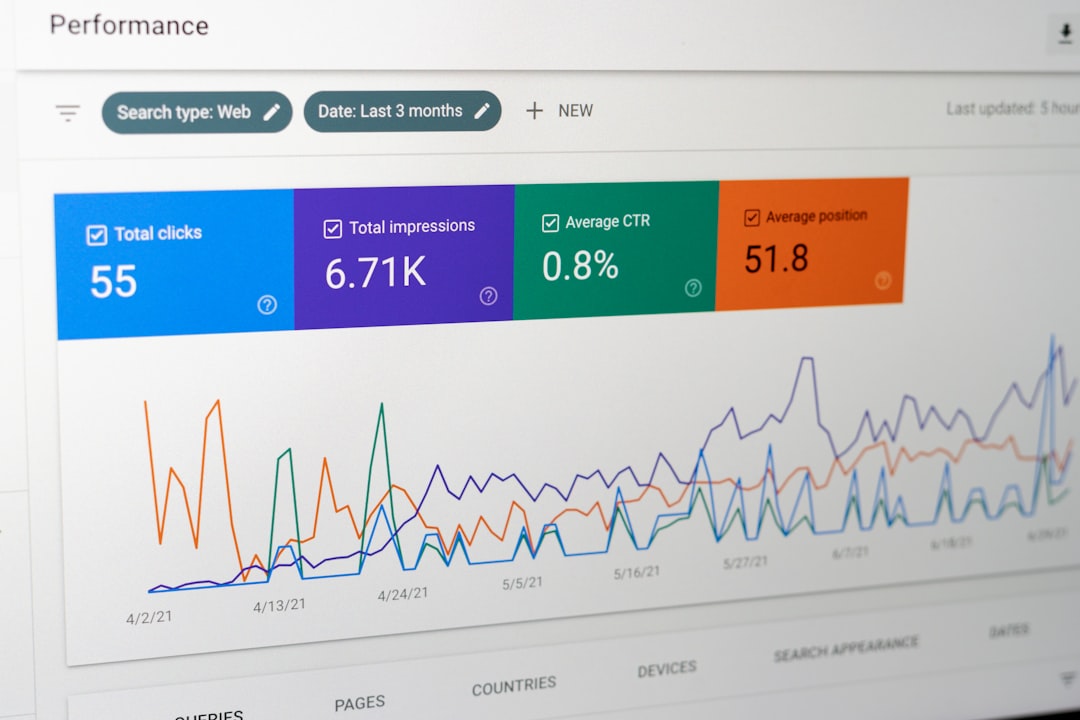
You can make smarter no-code SEO decisions if you look at actual search data first. Google Search Console shows which pages earn impressions, which queries trigger them, and where click-through rate is weak. That tells you whether to rewrite titles, expand a page, or improve internal links.
A simple review once a month is enough for many small sites. Look for pages with rising impressions but flat clicks, pages stuck on page two, and pages getting traffic from the wrong query. Those patterns usually reveal the next fix faster than plugin scores do.
If you are not sure what to prioritize, WordPress SEO Expert can help. We can review your site, identify what is actually holding rankings back, and help you avoid changing settings blindly.
Common no-code SEO mistakes
Most avoidable SEO problems on WordPress come from overcomplication, not lack of features. A scattered setup usually underperforms a simple one that is maintained consistently.
| Mistake | What to do instead |
|---|---|
| Using multiple SEO plugins | Keep one main plugin and remove overlaps |
| Publishing several pages on the same topic | Choose one primary page and consolidate overlaps |
| Writing titles for plugins instead of people | Use clear titles that match search intent |
| Ignoring internal links | Link related pages with descriptive anchor text |
| Uploading oversized images | Compress, resize, and add useful alt text |
| Chasing green lights | Measure clicks, impressions, and page performance instead |
When no-code SEO is enough, and when it is not
No-code SEO is often enough to improve titles, internal links, page structure, content depth, image handling, and many plugin settings. For a lot of small business WordPress sites, that covers the highest-impact issues first.
If rankings are still stuck after those fixes, the bottleneck is usually deeper. That can mean template bloat, crawl issues, redirect problems, weak content targeting, or a site architecture issue that needs technical cleanup. When that happens, guessing inside the dashboard usually wastes time.
If you are experiencing these issues, our team at WordPress SEO Expert can help. We will show you what to fix first, what can wait, and what is actually affecting performance.
Final takeaway
You can improve WordPress SEO without coding by simplifying the setup and tightening the fundamentals. Start with one clear topic per page, write better titles and descriptions, strengthen headings, add internal links, clean up images, and use Search Console to decide what to do next. That is usually enough to create real momentum.
Contact WordPress SEO Expert today to schedule a consultation. If you want a practical audit instead of generic SEO advice, we are happy to be the second set of eyes.

















