

Better rankings usually come from better sequencing, not more SEO activity. If your WordPress site has flat traffic despite ongoing effort, the issue is often scattered priorities: plugin clutter, weak page targeting, thin internal links, or technical settings that quietly dilute visibility.
A green light in an SEO plugin does not mean the page deserves to rank. The goal is not to chase scores. The goal is to make sure search engines can crawl the right pages, understand what each page targets, and see clear signals about which pages matter most.
This tutorial-style checklist walks through the fixes in the order they usually matter most. If you want a broader baseline first, review our practical guide for DIY WordPress site owners and our guide to fixing WordPress SEO setup problems.
Start With What Blocks Visibility

Fix the issues that block visibility before the issues that polish visibility. If indexing, crawl access, or duplication is wrong, rewriting copy and adjusting plugin settings will have limited impact.
Begin with your core pages: homepage, service pages, product pages, category pages that matter, and posts already getting impressions. These are the pages most likely to improve when your setup becomes clearer and more consistent.
WordPress SEO Tutorial Checklist
Use this checklist as a working order of operations. You do not need to do everything at once. Move top to bottom and resolve the highest-friction issues first.
| Priority | What to Check | Why It Matters |
|---|---|---|
| 1 | Search engine visibility settings | Prevents accidental blocking of your whole site |
| 2 | Indexing and sitemap status | Confirms important pages can be discovered |
| 3 | SEO plugin overlap | Reduces duplicate metadata and conflicting canonicals |
| 4 | Title tags and page targeting | Improves relevance and click potential |
| 5 | Heading structure | Helps organize page meaning for users and search engines |
| 6 | Archive and duplicate URL settings | Reduces crawl waste and content overlap |
| 7 | Internal links | Strengthens page discovery and topical relationships |
| 8 | Speed and plugin bloat | Improves usability and technical stability |
| 9 | Schema and metadata cleanup | Supports clearer technical signals |
| 10 | Search Console review | Shows what is actually improving or getting missed |
1. Check search engine visibility in WordPress
This is the first thing to verify because one setting can suppress your entire site. In WordPress, confirm that the site is not discouraging search engines from indexing your content.
Go to Settings, then Reading, and review the search engine visibility option. If that setting is enabled by mistake, fix it before doing anything else. Many sites inherit this problem after redesigns, staging-site launches, or rushed migrations.
2. Make sure your important pages are indexable
Your best pages cannot rank if they are set to noindex, buried too deeply, or missing from your sitemap. Start by checking whether your homepage, primary services, products, and top blog posts are eligible for indexing.
Open Google Search Console and review indexed versus excluded pages. Then confirm your SEO plugin is generating one clean XML sitemap. WordPress SEO Expert often finds that the real issue is not content quality but important pages being under-linked, noindexed, or mixed into a messy archive structure.
3. Use one SEO plugin only
One well-configured SEO plugin is enough. Running overlapping plugins often creates duplicate metadata, conflicting canonicals, and competing sitemap outputs that make troubleshooting harder than it needs to be.
If you have more than one SEO-related plugin handling titles, schema, redirects, or social metadata, simplify the stack. Keep one primary plugin and remove overlapping features where possible. Most site owners do not have one catastrophic problem. They have a stack of smaller issues that compound over time.
4. Rewrite weak title tags before you rewrite pages
Title tags usually have more immediate impact than body copy tweaks because they shape topical relevance and influence whether people click. Focus first on pages that already matter or already earn impressions.
Google recommends descriptive, concise title text and warns against repetitive boilerplate and keyword stuffing. That means generic titles should become clearer and more specific rather than longer or more stuffed.
| Weak title | Stronger title |
|---|---|
| SEO Services | SEO Company | SEO Expert | WordPress SEO Services for Small Businesses |
| Blog | WordPress SEO Tips for Service Businesses |
| Home | WordPress SEO Consultant for Growing Sites |
5. Keep one clear H1 and logical headings
Heading structure helps both usability and page clarity. Every important page should have one clear H1, followed by H2s for major sections and H3s for subsections.
Do not use headings just to make text larger. Use them to organize meaning. A clean hierarchy helps readers scan the page and helps search engines understand how the information is grouped.
6. Clean up archive pages and duplicate URLs
WordPress can generate more indexable URLs than many site owners realize. Author archives, tag archives, attachment pages, filtered URLs, and inconsistent canonical handling can all weaken the signals you want concentrated on real pages.
If you run a single-author site, author archives are often unnecessary. Thin tag archives usually add noise, not value. Review archive settings carefully and noindex pages that do not serve a distinct search purpose. If you need more setup guidance, our WordPress SEO setup problems guide walks through common cleanup priorities.
7. Strengthen internal links to key pages

Internal links are one of the most underused SEO levers on WordPress. They help search engines discover pages, understand relationships between topics, and recognize which pages deserve more attention.
Link blog posts to service pages where relevant. Link related posts to each other using descriptive anchor text. Make sure important pages are reachable through normal HTML links, not only through menus or sitemaps. Our practical WordPress SEO guide shows how these layers connect across the site.
8. Improve speed by simplifying, not stacking fixes
Speed matters most when a site feels slow, unstable, or overloaded. The best wins usually come from simplification: fewer plugins, compressed images, clean caching, and lighter templates.
Audit active plugins, compress oversized images, enable one caching system, and review your heaviest page templates. You do not need a perfect score. The goal is a site that loads cleanly, is easy to use, and sends consistent signals about which pages matter most.
9. Use schema as a support layer
Schema can help clarify page context, but it does not compensate for weak targeting or technical clutter. Treat it as a support layer after indexing, duplication, and on-page basics are under control.
Keep markup accurate and aligned with what users actually see on the page. Avoid turning on every schema type your plugin offers just because it is available. Cleaner implementation is usually more useful than broader implementation.
10. Review Search Console every month
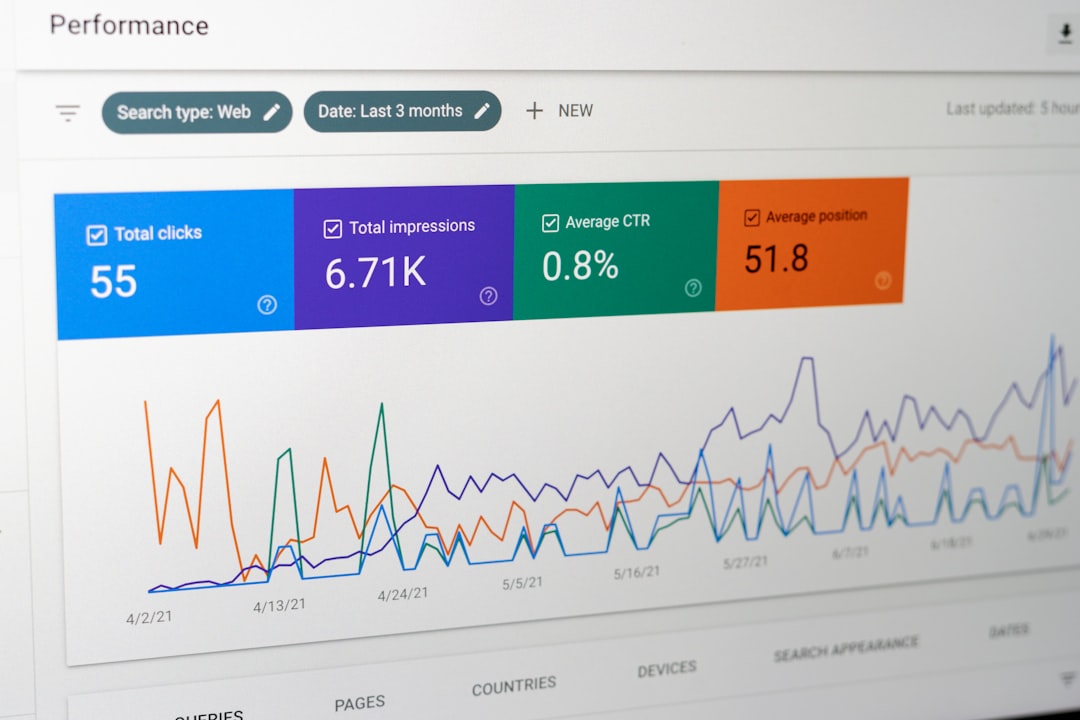
Search Console gives you the clearest feedback loop for SEO progress. It shows which pages are getting impressions, which queries are emerging, and where indexing problems are still holding pages back.
Look for pages ranking just outside the top results, pages with impressions but weak click-through, and newly excluded URLs. This is often where the fastest improvements come from because Google is already associating your pages with the right topics.
What to Ignore for Now
Not every SEO task deserves equal urgency. If your basics are unstable, avoid spending too much time on advanced settings, extra plugins, or cosmetic scoring features inside your SEO tool.
Do not chase perfect plugin scores. Do not publish thin posts just to increase volume. Do not assume every archive page should be indexed. Most WordPress SEO improvement comes from making the site easier to crawl, easier to understand, and easier to navigate.
When to Get Help
If you have worked through the checklist and rankings are still flat, the issue is usually diagnosis, not effort. That is especially true when the site has gone through redesigns, plugin changes, migration work, or years of inconsistent publishing.
If you’re experiencing these symptoms, our team at WordPress SEO Expert can help. We can review whether the real bottleneck is indexing, duplication, weak targeting, internal linking, or plugin clutter before you spend more time fixing the wrong things.
Final Takeaway
A better-ranking WordPress site usually comes from a cleaner system, not a more complicated one. One solid plugin, clearer page targeting, stronger internal links, and fewer indexation mistakes will usually outperform a bloated setup full of features you do not need.
Contact WordPress SEO Expert today to schedule a consultation. No pitch, no pressure. Just an honest look at what your site actually needs and whether your current setup is part of the solution or part of the problem.

















