

Low rankings usually come from a messy process, not one missing plugin. A practical WordPress SEO workflow gives each page a job, catches technical problems early, and creates a repeatable system your team can follow without guessing. That is how WordPress sites move from scattered tasks to steady search growth.
Most site owners do not have one catastrophic SEO issue. They have a stack of smaller issues: overlapping pages, weak internal links, thin title tags, plugin conflicts, and no clear review cycle. If that sounds familiar, this workflow will help you fix the right things in the right order. If you want a second set of eyes before changing settings, review a WordPress SEO checklist for new websites and compare your current setup against the basics. and compare your current setup against the basics.
What a WordPress SEO workflow should do
A good workflow should remove randomness. It should tell you what to check before publishing, what to improve after indexing, and how to decide whether a page needs rewriting, technical fixes, or stronger internal links.
The simplest way to think about it is this: research first, structure second, on-page optimization third, technical review fourth, and performance review last. Google recommends creating helpful, reliable, people-first content, using descriptive and concise titles, and using clear internal anchor text so users and search engines can understand page relationships. That means your workflow should focus on clarity, usefulness, and consistency instead of plugin scores or keyword stuffing.
The 6-step WordPress SEO workflow

This workflow works best when followed in order. If you skip straight to publishing more content without checking page purpose and technical health, you usually end up scaling the same problems that already hold the site back.
1. Map one target topic to one page
Every important page needs a clear purpose before you touch the copy. Assign one primary topic to the homepage, one primary topic to each service or category page, and supporting question-based topics to blog posts.
This step prevents cannibalization, which happens when multiple pages compete for the same search intent. A service page should not fight with a blog post for the same core term. If you are still defining page roles, a WordPress SEO strategy for small business guide shows how to align site structure with actual business goals.
2. Build the page around search intent
The page should answer the reason someone searched, not just repeat the phrase they typed. Before writing, decide whether the user wants a service, a product category, a comparison, a checklist, or a direct answer.
That decision shapes the layout. A service page may need proof, process, pricing approach, and a strong call to action. A blog post may need definitions, examples, and related next steps. When pages miss intent, rankings can stall even if the keyword is used correctly.
3. Optimize the on-page basics once the structure is right
On-page SEO matters, but only after the page has a clear job. Start with one descriptive H1, a concise title tag, a useful meta description, clean subheadings, and copy that answers the next obvious questions.
Google’s guidance on title links specifically recommends descriptive, concise titles and warns against keyword stuffing or repetitive boilerplate. In practice, that means weak titles like SEO Services | SEO Company | SEO Expert should be replaced with titles that describe the page more clearly. Stronger examples are specific, distinct, and tied to what the page actually offers.
4. Check technical SEO before and after publishing

Technical review should happen before a page goes live and again after it is indexable. The goal is to catch silent blockers such as noindex settings, poor canonicals, duplicate archives, redirect issues, and sitemap conflicts.
For most WordPress sites, the highest-priority checks are straightforward: confirm only one SEO plugin is active, verify the canonical is self-referencing where appropriate, make sure important pages are indexable, and check that your XML sitemap includes the pages you want indexed. If the site was redesigned or migrated, add redirect testing to this step immediately.
5. Add internal links while the page is still in review
Internal links should not be an afterthought. Add them before publishing so new pages are connected to the rest of the site through relevant, descriptive anchor text.
Google’s documentation says descriptive anchor text helps both people and Google understand the destination page more easily. That is why a phrase like pre-launch SEO checklist is more useful than click here. In workflow terms, every page should link to related service, strategy, or checklist content where it genuinely helps the reader move forward.
6. Review Search Console and update high-upside pages
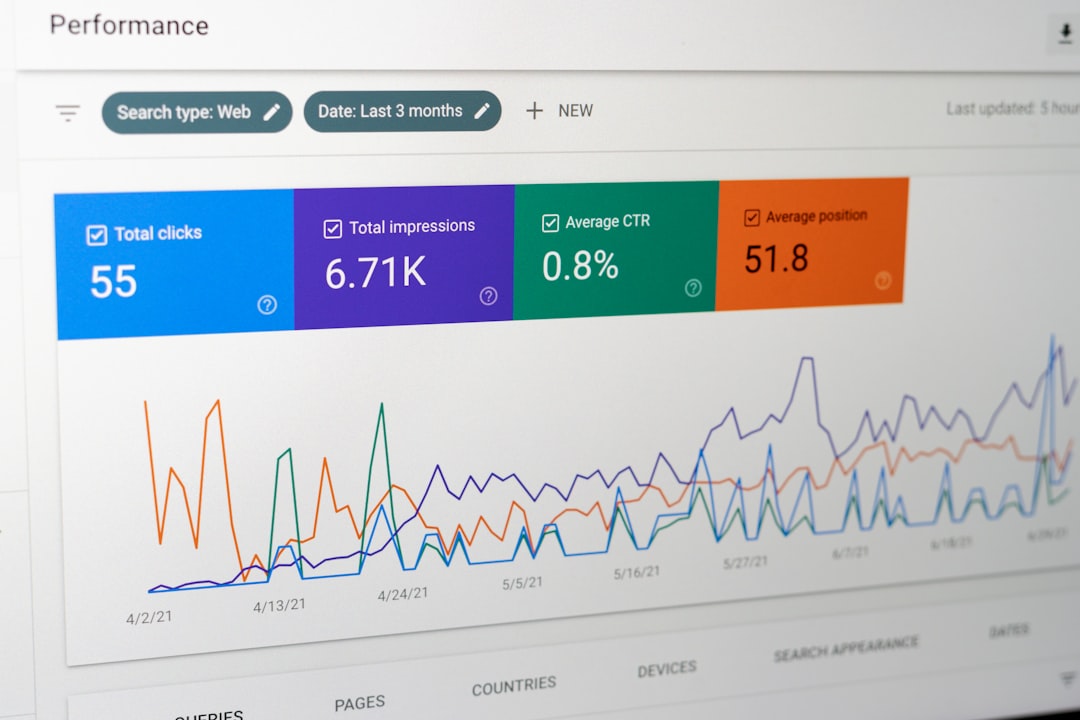
Publishing is not the end of the workflow. The final step is a recurring review of impressions, clicks, CTR, and average position so you know which pages deserve the next round of work.
Look for pages with rising impressions but weak CTR, or pages ranking on page two for terms that closely match the page intent. Those are usually your best update candidates. Most websites improve faster when they refresh existing pages with traction rather than publishing new posts blindly every week.
Priority table: what to fix first
If your workflow feels too broad, start with the highest-leverage items first. This sequence keeps teams from wasting time polishing copy on pages that still have structural or technical problems.
| Area | What to check first | Why it matters |
|---|---|---|
| Page targeting | One main topic per page | Prevents overlap and mixed relevance signals |
| Search intent | Match format to what the user wants | Improves engagement and topical fit |
| On-page SEO | Title tag, H1, headings, core copy | Makes the page easier to understand and click |
| Technical SEO | Indexing, canonicals, redirects, sitemap | Ensures the page can be crawled and interpreted correctly |
| Internal links | Add descriptive links from relevant pages | Helps discovery and passes context through the site |
| Performance review | Search Console impressions, CTR, position | Shows what to update next instead of guessing |
Common workflow mistakes on WordPress sites
Most workflow failures come from poor sequencing. Teams publish first, optimize later, and never return to pages once they are live. That creates content volume without real momentum.
Common mistakes include using multiple SEO plugins, writing several pages for the same service, relying on plugin green checks as the goal, skipping internal links, and ignoring Search Console after publication. Another big one is treating every page the same. Product pages, location pages, service pages, and blog posts each need a different review standard.
A simple monthly SEO workflow for WordPress
You do not need a complicated operating system to keep SEO moving. One short monthly cycle is enough for many small business and agency-managed WordPress sites.
| Week | Main task |
|---|---|
| Week 1 | Review Search Console, identify pages with the highest upside |
| Week 2 | Update one to three core pages for targeting, titles, and copy clarity |
| Week 3 | Check technical issues, internal links, and crawl blockers |
| Week 4 | Publish one supporting page or refresh an existing one |
This kind of cadence is easier to sustain than long plans that never get executed. If you are experiencing these issues, our team at WordPress SEO Expert can help.
Final takeaway
A WordPress SEO workflow should make decisions easier, not add more noise. Start with page purpose, align the content to intent, clean up the on-page basics, verify the technical setup, add internal links, and review performance on a schedule. That order catches the real bottlenecks before you waste time on lower-impact tweaks.
If you want a practical workflow built around your site, contact WordPress SEO Expert today to schedule a consultation. We will help you identify what to fix first and what can wait.

















