
mproving Google visibility requires more than adding keywords to WordPress pages. Search engines consider many signals when evaluating content, while users expect websites to be fast, useful, trustworthy, and easy to navigate.
If you want to improve your WordPress website SEO, focus on the fundamentals first and build from there.
Start With Search Intent
Before optimizing a page, understand what users expect when they search for a particular topic.
For example, someone searching for “WordPress SEO tips” probably wants practical information. Someone searching for “WordPress SEO agency” may be researching professional services.
Your content should match the purpose behind the search rather than simply repeating the target phrase.
Create Helpful, Well-Organized Content
Useful content gives visitors a reason to stay on your website.
Organize longer pages with:
- Clear H2 and H3 headings
- Short paragraphs
- Bullet points
- Examples
- Tables when useful
- Relevant images
Answer the main question early, then provide supporting details.
Avoid adding unnecessary paragraphs simply to increase word count.
Optimize Page Titles
Your title is one of the first things users see in search results.
A strong title should accurately describe the page and naturally reflect its main topic.
For example:
Weak: SEO Tips
Better: WordPress Website SEO Tips for Better Search Visibility
The second title gives users a clearer idea of what the page covers.
Improve Internal Linking
Internal links help distribute context throughout your website.
If you publish an article about WordPress site speed, you might connect it to related content about technical SEO, image optimization, or mobile performance.
Use descriptive anchor text and link only where the destination genuinely helps the reader.
Make Your Website Fast
Performance affects user experience, especially when visitors access your site from mobile devices.
Start by identifying the biggest performance problems. Common causes include:
- Oversized images
- Unnecessary plugins
- Heavy scripts
- Inefficient themes
- Poor hosting
- Missing caching or optimization
Do not install every speed plugin available. Review what your website actually needs.
Optimize Images
Images should support the content without unnecessarily increasing page size.
Use appropriately sized files and compress them before or during upload. Add descriptive alt text when the image provides meaningful information.
For decorative images, avoid adding unnecessary descriptions just for SEO.
Make Mobile Usability a Priority
Your website should be easy to use on smartphones and tablets.
Check whether:
- Text can be read without zooming
- Buttons are easy to tap
- Menus work correctly
- Images fit the screen
- Forms are usable
- Important content is not hidden
Mobile testing should be part of regular website maintenance.
Improve Technical SEO
Technical SEO helps search engines access and interpret your website.
Review:
- XML sitemap
- Robots.txt
- Indexing
- Canonical URLs
- Redirects
- Broken links
- Duplicate content
- Site performance
Google Search Console is particularly useful for finding indexing and search-related issues.
Build Topic-Relevant Content

Instead of publishing unrelated articles, create content around the subjects your business is genuinely connected to.
For a WordPress SEO service website, this might include:
- On-page SEO
- Technical SEO
- Local SEO
- WordPress performance
- Keyword research
- Content optimization
- SEO audits
Related content can strengthen the overall structure of the site.
Earn Quality Links
External links from relevant, trustworthy websites can help search visibility, but link building should focus on quality rather than quantity.
Useful approaches can include:
- Publishing original resources
- Digital PR
- Industry partnerships
- Expert contributions
- Useful data or research
- Relevant outreach
Avoid buying large quantities of low-quality links simply to increase backlink numbers.
Use Google Search Console
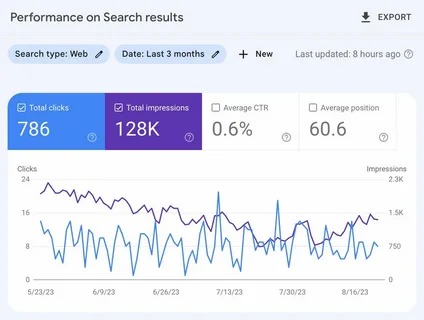
Search Console provides valuable information about how Google interacts with your site.
Review:
- Search queries
- Impressions
- Clicks
- Average position
- Indexed pages
- Page indexing issues
Use this information to identify pages that already have potential and areas that need improvement.
Improve Existing Pages
You do not always need to create something new.
Look at pages that receive impressions but relatively few clicks. Their titles and descriptions may need improvement.
Also review pages that rank for related searches but do not fully answer the topic. Expanding or restructuring those pages can make them more useful.
Track Business Outcomes
SEO should ultimately support your website’s goals.
Depending on the business, measure:
| Metric | Purpose |
|---|---|
| Organic traffic | Measures search visits |
| Leads | Measures potential customers |
| Conversions | Measures completed goals |
| Clicks | Measures search traffic |
| Impressions | Shows search visibility |
Higher rankings can increase visibility, but relevant traffic and meaningful actions are important too.
For competitive websites, a WordPress SEO consultant can help combine technical audits, content strategy, keyword research, and performance monitoring into one structured process.
The most sustainable SEO improvements usually come from consistently making useful, technically sound changes rather than chasing quick ranking shortcuts.

















