

Low rankings usually come from a scattered plan, not one missing plugin. A solid WordPress Google SEO audit shows you whether the real problem is indexing, page targeting, internal links, titles that do not earn clicks, or technical clutter that keeps good pages from performing.
Most site owners do not have one catastrophic SEO issue. They have a stack of smaller issues that compound over time. That is why an audit should not start with plugin scores. It should start with the pages that matter most, the data Google gives you, and the technical settings that can quietly suppress visibility.
The goal is simple: fix the issues that block visibility before the issues that polish visibility. If you need a broader framework after this audit, review what actually moves WordPress rankings and compare your findings against the pages that drive revenue.
What a WordPress Google SEO audit should answer
A useful audit should tell you why rankings are flat, where Google is already showing your pages, and which fixes deserve attention first. If the audit ends with a giant checklist and no priority order, it will probably create more work than progress.
Start by answering five direct questions. Are your important pages indexable. Does each core page target a clear search intent. Are your title tags and headings descriptive enough to earn clicks. Are internal links guiding users and search engines toward your money pages. Are technical issues creating duplicate or low-value URLs.
Google recommends descriptive, concise title text and warns against keyword stuffing and repetitive boilerplate in title elements. Google also notes that internal anchor text helps people and Google understand your site more easily, which makes title and link audits more valuable than another round of plugin tweaking. For background on plugin overlap, see our comparison of Yoast SEO vs Rank Math before you add anything new.
Step 1: Check indexing before anything else

If Google cannot index the page, nothing else matters. Before you rewrite titles or publish more content, confirm that your important URLs are live, crawlable, canonicalized correctly, and not blocked by site settings or plugin rules.
Review your homepage, service pages, top blog posts, and category pages first. Confirm that each page returns a normal live response, loads for users, and is not marked noindex by mistake. Then check that search engines are seeing the preferred version of each URL instead of a duplicate variation.
Common WordPress problems here include staging settings left in place, archives indexed with thin content, duplicate URL paths, redirect chains after a redesign, and canonicals that point to the wrong page. These are quiet failures because the page may look fine to you while sending mixed signals to Google.
What to review in this step
| Audit item | What to confirm |
|---|---|
| Indexability | Important pages are not blocked by noindex settings or other site restrictions |
| Canonical signals | Each important page points to itself or the correct preferred version |
| Redirects | Old URLs resolve cleanly to the best current page without chains |
| Archives | Tag, author, and date archives are handled intentionally, not left to create thin duplicates |
| URL consistency | Only one main version of each page is being promoted and linked internally |
Step 2: Use Google Search Console as your audit base
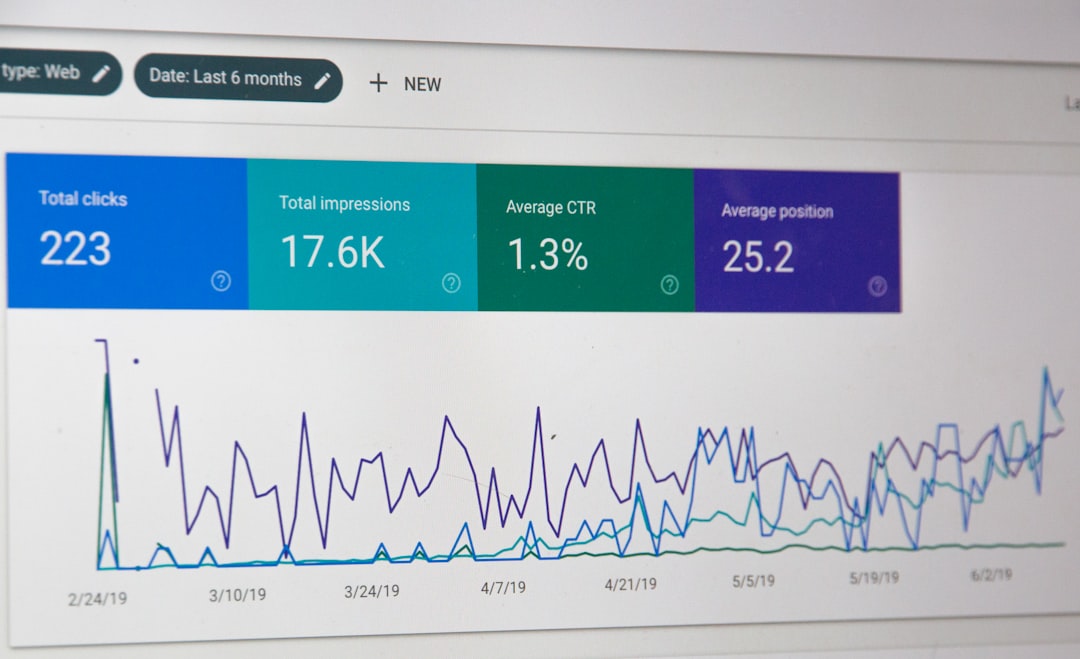
Google Search Console should be your main feedback loop because it shows how your site performs in Google Search, not how a plugin estimates your optimization. The Performance report includes clicks, impressions, average CTR, and average position, which makes it the fastest way to find pages with upside.
Look for three patterns first. Pages with impressions but few clicks often need better titles and descriptions. Pages with fair average position but weak leads may have an intent mismatch. Sections that lose impressions after a redesign or migration often point to technical or structural problems.
Be careful when reading averages. Google explains that Performance data can be aggregated by property or by page, and those views can produce different CTR and position numbers. That means the trend matters more than obsessing over one average across the whole site.
What to pull from Search Console
Export your top pages by impressions. Then compare those pages against clicks, CTR, and average position. You are looking for pages that Google already trusts enough to show, but users are not choosing often enough. That is usually where titles, descriptions, and stronger on-page alignment pay off fastest.
| Signal | Likely audit finding |
|---|---|
| High impressions, low clicks | Weak title tag, weak meta description, or low SERP appeal |
| Decent position, poor conversions | Search intent mismatch or weak calls to action |
| Traffic drop after launch | Redirect, indexing, template, or canonical problem |
| Several pages ranking for similar terms | Keyword cannibalization or overlapping content |
| Important page gets few impressions | Weak internal linking, poor targeting, or crawl/index issues |
If you are seeing those patterns and are not sure what they mean, our team at WordPress SEO Expert can help you separate content problems from technical ones before you spend weeks fixing the wrong layer.
Step 3: Audit page targeting and search intent
Every important page should have one main job. If your homepage, service page, and blog post all chase the same phrase, Google gets mixed signals and none of those pages may rank as well as one stronger page would.
Map one primary topic to each key URL. Your homepage should usually target the broadest commercial theme. Service pages should target buyer-intent searches. Blog posts should support those pages by answering related questions and linking back naturally.
This is also where you catch thin near-duplicates. If several posts cover tiny keyword variations with nearly identical advice, consolidate them into one stronger asset. Most site owners do not need more pages at this stage. They need clearer page roles.
Step 4: Review titles, headings, and on-page clarity
Good on-page SEO is about clarity, not repetition. Audit whether each important page has one clear H1, a concise and descriptive title tag, useful subheadings, and copy that actually answers the next question a searcher would ask.
A green light in an SEO plugin does not mean the page deserves to rank. Google says title text should be descriptive and concise, and its documentation warns against repetitive boilerplate and keyword stuffing. In practice, that means many WordPress sites would benefit more from rewriting ten weak titles than publishing ten new posts.
| Weak title | Stronger title |
|---|---|
| SEO Services | SEO Company | SEO Expert | WordPress SEO Services for Small Businesses |
| Blog | SEO Tips | Marketing | WordPress SEO Tips for Small Business Sites |
| Technical SEO | Website Help | Technical SEO Audit for WordPress Sites |
Also review meta descriptions for click appeal, not ranking magic. They may not directly improve rankings, but they can improve the percentage of searchers who choose your result when Google shows the page.
Step 5: Audit internal links and site structure

Internal linking is one of the simplest audit wins because it helps users find the next useful page and helps Google understand which pages matter most. If important pages are buried, orphaned, or barely referenced, you are making rankings harder than they need to be.
Check whether your main services are reachable within a few clicks from the homepage. Review whether blog posts link back to related service pages. Look for generic anchor text and replace it with descriptive phrases that explain what the destination page covers.
Your navigation, breadcrumbs, category structure, and in-content links should all reinforce the same hierarchy. When they do not, search engines have a harder time reading page importance. If site speed is also holding back user experience, pair this audit with our guide on improving WordPress site speed for SEO so structure and usability improve together.
Step 6: Check technical clutter that compounds over time
Most technical WordPress SEO problems are not advanced. They are small configuration issues that pile up: overlapping plugins, bloated templates, weak redirects, unmanaged archives, duplicate taxonomy paths, and pages that exist without a clear purpose.
One well-configured SEO plugin is enough. Running overlapping SEO plugins often creates duplicate metadata, conflicting canonicals, and competing sitemap outputs. Your audit should confirm that only one plugin is controlling the basics and that its settings match the structure of the site.
You do not need a perfect score. The goal is a site that loads cleanly, is easy to crawl, and makes the important pages obvious. Fix the issues that block visibility before the issues that polish visibility.
A simple WordPress SEO audit priority order
The fastest way to waste time is treating every SEO issue as equally urgent. A short audit priority order keeps your team focused on the highest-leverage fixes instead of bouncing between plugins, content edits, and technical tasks with no sequence.
| Priority | What to fix first |
|---|---|
| 1 | Indexing, crawl, and obvious technical blockers |
| 2 | Page targeting, search intent, and keyword overlap |
| 3 | Title tags, headings, and core page copy |
| 4 | Internal links and site structure |
| 5 | Supporting content after main pages are solid |
This sequence works because it fixes the foundation before adding volume. Publishing more content on a messy site often creates more overlap, more weak pages, and more reporting noise.
Final takeaway
A WordPress Google SEO audit should leave you with a ranked list of actions, not a vague feeling that everything needs work. Start with indexing and Search Console data, then move through targeting, titles, internal links, and technical cleanup in order.
If your rankings are flat and you want an honest diagnosis, WordPress SEO Expert can help. Book a free SEO consultation. No pitch, no pressure. Just a clear look at what your site actually needs and whether your current setup is part of the solution or part of the problem.
Contact WordPress SEO Expert today to schedule a consultation and turn your audit into a practical 90-day action plan.

















