
Low rankings on a WordPress site usually come from a stack of small issues, not one missing plugin. The best practices below focus on the fixes that change crawling, indexing, page quality, and user experience first, instead of chasing plugin scores or adding more tools.
There is no single checklist that fits every site, but there is a reliable order of operations. Start with crawl and index settings, move to site structure and on-page basics, then clean up speed, internal linking, and content depth. If you need a launch-focused version of this process, review our WordPress SEO checklist for new websites.
Start With One Clean SEO Setup
The first best practice is simpler than most site owners expect: use one SEO plugin, not multiple overlapping plugins. Stacked SEO tools often create conflicting title tags, canonicals, sitemaps, and schema output, which makes diagnosis harder instead of easier.
Choose one established SEO plugin, configure it well, and keep the rest of the stack lean. Your plugin should handle titles, meta descriptions, XML sitemaps, schema basics, and social sharing defaults. The goal is not to maximize features. The goal is to produce clean output that search engines can understand consistently.
Make Sure Search Engines Can Crawl and Index the Right Pages

Many WordPress SEO problems begin before content quality even matters. If important pages are blocked, noindexed, duplicated, or buried, Google cannot evaluate them properly no matter how well written they are.
Check the basics first. Confirm the Search Engine Visibility setting is not discouraging indexing. Review your robots rules carefully because Google explains that robots.txt is not a reliable way to keep pages out of search results. If a page should stay out of search, use a proper noindex directive instead.
Next, verify that your preferred domain version resolves cleanly, your pages use self-consistent canonicals, and your sitemap reflects only pages you actually want indexed. If you are unsure how to validate those settings before or after a redesign, our pre-launch WordPress SEO checklist walks through the exact trouble spots.
Use a Logical Site Structure
WordPress SEO works better when the site architecture is obvious. Important pages should be easy to reach from the main navigation, category structure should make sense to humans, and URLs should reflect the content hierarchy without becoming bloated.
In practice, that means using clean permalinks, avoiding unnecessary nested paths, and limiting thin archive pages that add little value. Category pages can be useful when they act like real hubs. Tag archives, date archives, and attachment pages often create low-value duplication unless you have a clear reason to keep them indexable.
Write Titles and Descriptions for Humans First
Better titles improve both relevance and click-through rate. Google recommends titles that are descriptive, concise, and distinct for each page, and specifically advises against keyword stuffing and repetitive boilerplate across the site.
That guidance comes directly from Google’s documentation on title links and the SEO Starter Guide. A weak WordPress title often reads like this: SEO Services | SEO Company | SEO Expert. A stronger title is more specific to the page topic and user intent.
Write custom titles for your homepage, service pages, and highest-value posts. Use meta descriptions to improve click appeal, but do not treat them as ranking shortcuts. Their main job is to help the searcher understand why your page is worth opening.
Match Each Page to One Clear Search Intent
Most pages underperform because they try to target several different intents at once. A service page, tutorial, comparison, and sales page cannot all be the same document without becoming unfocused.
Before optimizing any page, decide what the searcher actually wants. Are they trying to learn, compare options, solve a technical issue, or hire someone? Once that intent is clear, the page structure becomes easier to build. Your heading hierarchy, examples, CTA, and internal links should all support that one job.
Strengthen Internal Linking With Descriptive Anchors
Internal links help Google understand page relationships and help users find the next useful step. This is one of the most overlooked WordPress SEO practices because it feels small, but across an entire site it changes crawl paths, topical context, and engagement.
Google recommends using descriptive anchor text so both people and search engines can make sense of the destination page. Instead of vague anchors, link phrases that explain the topic naturally. For example, if speed issues are part of the ranking problem, point readers to our guide on how to improve WordPress site speed for SEO rather than a generic label.
Improve Speed, But Stop Chasing Perfect Scores
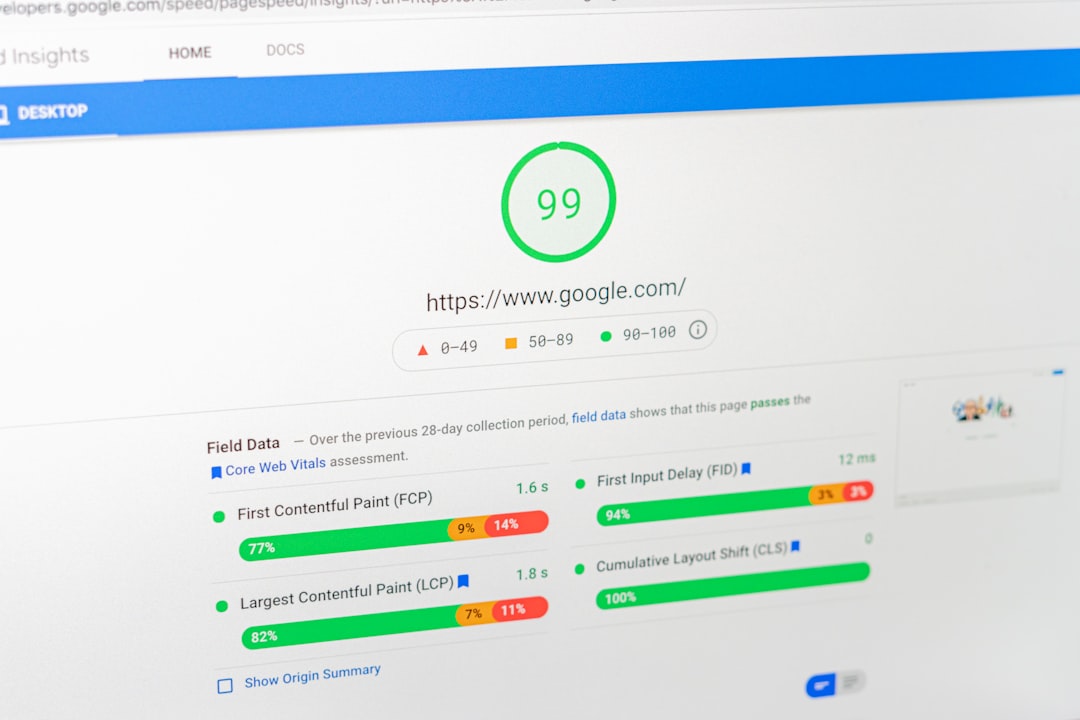
Page speed matters, but not in the way most plugin sales pages suggest. Speed is best treated as a bottleneck remover. If your site is slow enough to frustrate users or fail Core Web Vitals badly, it can hold back performance. If it is already solid, obsessing over tiny score improvements is usually wasted effort.
Start with the high-impact fixes: compress large images, use modern formats, enable caching, reduce unnecessary plugins, and defer non-critical scripts where possible. Most site owners do not have one catastrophic speed problem. They have oversized media, theme bloat, and too many scripts loading sitewide. Our guide on real WordPress speed fixes shows how to prioritize those issues without turning optimization into performance theater.
Prioritize These WordPress SEO Fixes First
If your rankings are stuck, fix the foundational issues before publishing more content. This order keeps you from wasting time on low-impact tasks while technical problems are still holding pages back.
| Area | What to check first | Why it matters |
|---|---|---|
| Indexing | Search visibility, noindex tags, robots rules, XML sitemap | Pages cannot rank if they are blocked, excluded, or missing from discovery paths |
| Site structure | Permalinks, canonicals, archive settings, navigation depth | Clean architecture reduces duplication and helps search engines understand page priority |
| On-page SEO | Title tags, headings, search intent match, content depth | Clear relevance signals improve both rankings and click-through potential |
| Internal links | Contextual links between related pages with descriptive anchor text | Internal linking distributes authority and clarifies topic relationships |
| Performance | Images, caching, script load, plugin bloat | Faster pages improve usability and remove avoidable technical friction |
Do Not Let Plugins Replace Judgment
A green score inside an SEO plugin does not mean a page deserves to rank. Plugins are useful for output, templates, and reminders, but they cannot judge search intent, content quality, competitive depth, or whether the page actually solves the visitor’s problem.
This is where many WordPress sites get stuck. The page looks optimized in the dashboard, but the real issue is thin content, weak internal linking, mismatched intent, or technical clutter. If you are experiencing these symptoms, our team at WordPress SEO Expert can help identify what is actually holding the site back before you change more settings.
Best Practices That Hold Up Over Time
The best long-term WordPress SEO habits are boring in the right way. Publish pages that deserve to exist, keep the technical setup clean, update important content when it falls behind, and make sure every page has a clear role in the site structure.
That usually outperforms scattered tactics like installing extra plugins, rewriting titles every week, or obsessing over keyword density. Stable rankings come from relevance, crawlability, clarity, and a site that is easy to use.
If you want a second set of eyes before changing templates, plugin settings, or index rules, WordPress SEO Expert can review the site and prioritize the fixes that matter most. Contact WordPress SEO Expert today to schedule a consultation.

















