
Getting higher Google rankings requires more than adding keywords to WordPress pages. Search engines need to understand what a website offers, while users need useful content, clear navigation, and a good experience.
A WordPress SEO Consultant approaches optimization by looking at the website as a complete system. This includes keyword targeting, content quality, technical SEO, internal linking, page experience, and ongoing performance tracking.
There is no single trick that guarantees higher rankings. Instead, consistent improvements across important areas can create a stronger foundation for organic search visibility.
Here are practical WordPress SEO Consultant tips that can help improve a website’s search performance.
1. Start With an SEO Audit
Before changing a website, understand what is already working and what needs improvement.
An SEO audit should examine:
- Indexed pages
- Organic traffic
- Existing rankings
- Page titles
- Headings
- URLs
- Internal links
- Broken links
- Redirects
- XML sitemap
- Robots.txt
- Canonical URLs
- Mobile experience
- Page speed
- Existing content
This creates a clear starting point.
Instead of making random changes, you can prioritize problems based on their potential impact on the website.
2. Choose Keywords Based on Search Intent

Keyword research should not be based only on search volume.
A good WordPress SEO Consultant also considers what the person actually wants when searching.
For example, these searches have different purposes:
“WordPress SEO tips”
The user may want educational information.
“WordPress SEO consultant”
The user may be researching a professional service.
“hire WordPress SEO consultant”
The user may be closer to making a purchasing decision.
The page should match the intent behind the search instead of simply repeating the keyword.
3. Give Every Important Page a Clear Purpose
A website should not have several pages competing for exactly the same topic.
For example, a business could structure its website around:
- WordPress SEO Services
- Technical SEO
- On-Page SEO
- Local SEO
- SEO Audit
- WordPress SEO Consultant
Each page should explain a distinct service or topic.
This makes the website easier to understand and gives each page a clear role in the overall SEO strategy.
4. Improve Existing Pages Before Creating More
Publishing new blog posts every week is not always the best way to improve SEO.
Older pages may already have impressions, backlinks, rankings, or organic traffic. Improving those pages can be a valuable part of an SEO strategy.
Review existing content for:
- Outdated information
- Weak introductions
- Missing sections
- Poor formatting
- Weak internal links
- Incorrect information
- Search intent mismatch
Do not update content simply for the sake of changing it. Make improvements that genuinely make the page more useful.
5. Write Better Page Titles
A page title helps users and search engines understand the subject of a page.
A strong title should be:
- Clear
- Relevant
- Descriptive
- Natural
- Appropriate for the page
For example:
Weak:
SEO | SEO Expert | SEO Consultant | WordPress SEO
Better:
WordPress SEO Consultant: Strategy, Services, and Benefits
The second title communicates the topic more clearly without unnecessary repetition.
6. Use Headings to Organize Content
Large blocks of text can be difficult to read.
Use meaningful headings to divide content into logical sections.
For example:
WordPress SEO Services
How Our SEO Process Works
Common WordPress SEO Problems
How SEO Performance Is Measured
Headings should describe the information that follows them. They should not exist simply to insert keywords.
7. Build a Strong Internal Linking Structure
Internal links help visitors discover related pages and can help search engines understand the relationships between different parts of a website.
For example, a blog about WordPress website speed could link naturally to:
- WordPress SEO services
- Technical SEO
- Website performance guides
When adding an internal link, ask whether it provides additional value to the reader.
Avoid adding irrelevant links just to increase the number of internal links.
8. Improve Website Structure
A logical website structure makes navigation easier.
A service-based WordPress website could follow a structure such as:
Homepage → Services → Individual Services → Supporting Content
Blog posts can support service pages by answering questions related to those services.
This creates connections between informational and commercial content while making important pages easier to discover.
9. Fix Technical SEO Problems
Technical issues can affect whether search engines can properly access and understand a website.
A WordPress SEO Consultant should review:
- Indexability
- XML sitemap
- Robots.txt
- Canonical URLs
- Redirects
- 404 errors
- Duplicate pages
- HTTPS
- Site architecture
For example, if an important service page accidentally contains a noindex directive, it may not appear in Google’s index as expected.
Technical checks should therefore be part of regular SEO work.
10. Improve Page Speed
Users generally expect websites to load quickly and respond smoothly.
Review pages for issues such as:
- Large images
- Excessive scripts
- Unnecessary plugins
- Poor hosting performance
- Unoptimized resources
- Heavy page elements
Tools such as Google PageSpeed Insights can help identify areas that require attention.
However, the goal should not simply be to achieve a perfect tool score. The focus should be on creating a faster and more useful experience for real visitors.
11. Prioritize Mobile Experience
A WordPress website should work properly across different screen sizes.
Check important pages on mobile devices for:
- Readability
- Navigation
- Buttons
- Forms
- Images
- Pop-ups
- Page loading
- Content layout
A responsive theme is useful, but it does not guarantee that every page provides a good mobile experience.
12. Create Useful, Topic-Focused Content
Content should answer real questions and provide meaningful information.
Before publishing a blog post, ask:
- Who is this content for?
- What question does it answer?
- What information does the reader need?
- Does it provide something useful?
- Does it match the search intent?
Avoid creating articles simply because a keyword has been added to a content calendar.
Quality and relevance should guide content production.
13. Optimize Images Properly

Images can improve a page visually, but large files can also affect performance.
A WordPress SEO Consultant should review:
- Image dimensions
- File size
- File names
- Alt text
- Appropriate formats
Alt text should describe an image when it serves a useful purpose.
For example:
WordPress SEO consultant reviewing website performance
is more useful than:
WordPress SEO consultant SEO consultant WordPress SEO
The first is descriptive and natural.
14. Strengthen Trust and Useful Information
For service websites, visitors need enough information to understand who they are dealing with and what the business provides.
Important pages may include:
- About
- Contact
- Services
- Privacy Policy
- Terms and conditions
- Relevant business information
Service pages should also clearly explain what is offered, who it is for, and what visitors can expect.
Clear information helps create a more useful website experience.
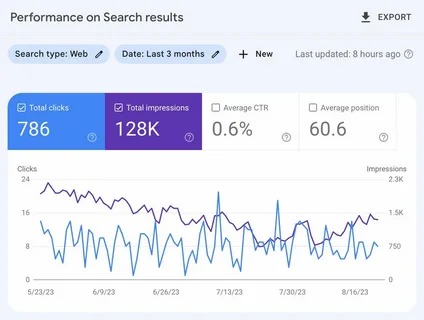
15. Use Google Search Console
Google Search Console provides valuable information about how a website appears in Google Search.
A consultant can monitor:
- Search queries
- Impressions
- Clicks
- Click-through rate
- Average position
- Indexing issues
- Sitemap status
For example, a page may receive many impressions but relatively few clicks. That can provide a reason to review its title and search-result presentation.
Search Console can also help identify technical issues that require attention.
16. Monitor Individual Pages
Looking only at total website traffic can hide important details.
Review individual pages to understand:
- Which pages attract organic traffic
- Which pages gain impressions
- Which pages are losing visibility
- Which pages generate conversions
- Which pages need improvement
This allows SEO work to become more specific instead of treating the entire website as one unit.
17. Avoid Shortcuts and Unrealistic Promises
SEO shortcuts can create unnecessary risks.
Be cautious about strategies based on:
- Keyword stuffing
- Automated low-quality content
- Spammy links
- Duplicate pages
- Manipulative tactics
- Guaranteed ranking promises
Search visibility is influenced by many factors, and no consultant can control Google’s search results directly.
A sustainable strategy focuses on useful content, accessible pages, relevant links, technical quality, and a good user experience.
A Practical WordPress SEO Process
A simple workflow can look like this:
| Step | Main Focus |
|---|---|
| 1 | Audit the website |
| 2 | Research keywords |
| 3 | Understand search intent |
| 4 | Map topics to pages |
| 5 | Improve existing content |
| 6 | Fix technical issues |
| 7 | Strengthen internal links |
| 8 | Improve speed and mobile experience |
| 9 | Monitor Search Console |
| 10 | Review and refine |
Following a repeatable process makes SEO easier to manage and measure.
When Should You Hire a WordPress SEO Consultant?
Professional assistance can be useful when a website has persistent ranking issues, technical problems, declining organic traffic, or a large amount of content that needs strategic improvement.
A WordPress SEO Consultant can audit the website, identify priorities, and create a strategy based on the site’s goals rather than applying the same checklist to every business.
This can be especially useful when website owners are unsure whether their main problem is technical SEO, content, keyword targeting, website structure, or search intent.
Final Thoughts
Improving Google rankings is usually the result of many small and meaningful improvements rather than one quick fix.
A WordPress SEO Consultant should focus on understanding search intent, targeting relevant topics, improving existing pages, building strong internal links, fixing technical problems, improving page experience, and monitoring actual search performance.
The most important principle is to optimize for both search engines and people. A page should be technically accessible, but it should also answer the visitor’s question clearly and provide a useful experience.
With a consistent process and regular monitoring, WordPress websites can build a stronger foundation for long-term organic search growth.
Frequently Asked Questions
Can a WordPress SEO Consultant guarantee higher Google rankings?
No. SEO professionals can improve a website’s technical setup, content, and overall search strategy, but Google rankings cannot be guaranteed.
How often should WordPress SEO be reviewed?
SEO should be monitored regularly, while a more detailed audit can be performed periodically or after major website changes.
Are keywords still important for WordPress SEO?
Yes, but they should be used naturally and in the context of the page’s topic and search intent.
Should I create new blogs every week?
Not necessarily. Publishing frequency should depend on the website’s audience, goals, existing content, and available resources. Improving valuable existing content can also be important.
What is the first step toward better rankings?
Start with an SEO audit. Understanding the website’s current technical health, content, keyword targeting, and search performance makes it easier to decide what should be improved first.

















