
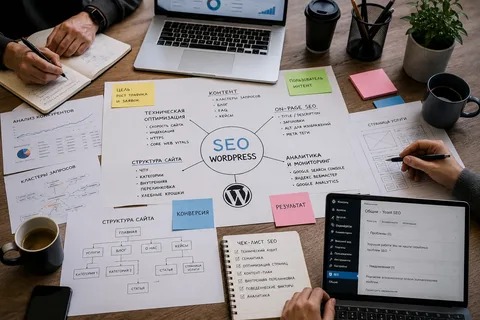
WordPress SEO can feel confusing when you are trying to understand rankings, keywords, technical issues, content, and website performance all at once. Many website owners know that SEO is important, but they are not always sure what needs to be done first or why their website is not getting enough organic traffic.
A WordPress SEO Expert focuses on improving a website so search engines can understand its pages and users can find useful information easily. This includes technical optimization, content improvements, keyword targeting, internal linking, mobile performance, and ongoing monitoring.
Below are some of the most common WordPress SEO questions, explained in a practical way.
What Is WordPress SEO?
WordPress SEO is the process of optimizing a WordPress website to improve its visibility in search engines such as Google.
It includes several areas:
- Keyword research
- Page titles and headings
- Helpful website content
- Internal linking
- Website structure
- Technical SEO
- Mobile optimization
- Page speed
- Image optimization
- Indexing and crawlability
- Search performance tracking
The goal is not simply to add keywords to a website. A strong SEO strategy helps search engines understand the website while making the content useful for visitors.
Why Does a WordPress Website Need SEO?

Creating a WordPress website does not automatically mean that people will find it through Google.
A website can have a professional design but still receive little organic traffic if its pages are poorly optimized, difficult to navigate, slow, or targeting the wrong search terms.
SEO helps connect your website with people who are already searching for the products, services, or information you provide.
For example, a web design company might create a page targeting “WordPress web design services.” If that page clearly explains the service, answers customer questions, uses an appropriate title, and has strong internal links, it gives both users and search engines a clearer understanding of the page.
Does WordPress Automatically Handle SEO?
WordPress provides a useful foundation, but it does not automatically complete every SEO task.
Important areas such as keyword targeting, content quality, internal linking, technical checks, image optimization, redirects, and search performance still need attention.
SEO plugins can make some tasks easier, but installing a plugin is not the same as having a complete SEO strategy.
A website should be reviewed as a whole rather than relying only on plugin recommendations.
What Does a WordPress SEO Expert Do?
A WordPress SEO Expert can work on both technical and content-related areas of a website.
Typical tasks include:
- Auditing the website
- Researching relevant keywords
- Optimizing important pages
- Improving titles and headings
- Reviewing URLs
- Building internal links
- Finding broken links
- Checking indexing issues
- Improving page speed
- Optimizing images
- Reviewing mobile usability
- Updating old content
- Monitoring Google Search Console data
The exact work depends on the website’s current condition and business goals.
How Do I Choose the Right Keywords?
Keyword selection should be based on what your target audience actually searches for.
Instead of choosing keywords simply because they have high search volume, consider:
- Search intent
- Relevance to your business
- Competition
- The type of page needed for the search
- Whether the keyword can bring relevant visitors
For example, someone searching “what is WordPress SEO” has an informational intent, while someone searching “WordPress SEO services” may be looking for professional assistance.
These searches should not necessarily lead to the same type of page.
Should Every Page Target a Different Keyword?
Not every page needs a completely unrelated keyword, but important pages should have a clear primary topic.
If several pages are created around exactly the same search intent, they may compete with each other instead of creating a useful website structure.
A better approach is to give each important page a clear purpose.
For example:
| Page | Main Purpose |
|---|---|
| Homepage | Introduce the business |
| SEO Services | Explain SEO services |
| Local SEO | Target local SEO needs |
| SEO Audit | Explain audit services |
| Blog | Answer informational questions |
This makes the website easier to understand and creates opportunities for relevant internal links.
How Important Are Titles and Headings?
Titles and headings help users and search engines understand what a page is about.
A page title should accurately describe the page rather than simply repeating keywords.
Headings should also organize the content logically. A visitor should be able to scan the page and understand its main sections without reading every sentence.
For example, instead of creating a heading such as:
“SEO SEO Expert WordPress SEO Services SEO”
a natural heading could be:
“How WordPress SEO Services Improve Website Visibility”
The second version communicates the topic clearly without keyword stuffing.
Does Internal Linking Really Matter?
Yes. Internal links connect different pages on the same website.
They can help visitors discover related information and help search engines understand how different pages relate to one another.
For example, a blog discussing WordPress website speed could naturally link to a page explaining technical SEO services.
Internal links should be relevant and useful rather than added simply to increase the number of links.
Why Is My WordPress Website Not Ranking?
There is rarely one universal reason why a website does not rank.
Possible issues include:
- Poor keyword targeting
- Weak or unhelpful content
- Technical SEO problems
- Indexing issues
- Slow page performance
- Poor mobile experience
- Weak internal linking
- Strong competition
- Lack of website authority
- Pages targeting the wrong search intent
Google Search Console can be particularly useful for identifying indexing and search-performance problems.
Instead of changing everything at once, it is better to identify the actual problem and address it systematically.
How Long Does WordPress SEO Take?

SEO does not normally produce consistent results overnight.
The timeline depends on factors such as:
- Website age
- Competition
- Existing authority
- Technical condition
- Content quality
- Search demand
- SEO work being performed
Some improvements can be noticed relatively quickly, especially technical corrections, while meaningful organic growth may require continued work over a longer period.
The important point is to measure progress rather than expecting every page to rank immediately.
Is Page Speed Important for WordPress SEO?
Page performance matters because users expect websites to load and respond efficiently.
Large images, unnecessary plugins, poor hosting, excessive scripts, and unoptimized themes can contribute to performance problems.
A WordPress SEO review should therefore consider both SEO and user experience.
Tools such as Google PageSpeed Insights can help identify performance issues that may need attention.
Do Images Affect SEO?
Images can support SEO when they are relevant and properly optimized.
Important practices include:
- Using descriptive file names
- Writing useful alt text where appropriate
- Compressing large images
- Using suitable image dimensions
- Avoiding unnecessary images
- Choosing formats that support good performance
Alt text should describe the image when it provides useful information. It should not be filled with keywords simply for SEO.
Should I Keep Updating Old Blog Posts?
Yes, when an older article is still relevant but needs improvement.
An existing article may have outdated information, weak sections, missing internal links, or opportunities to better satisfy current search intent.
Instead of publishing a completely new article every time, review existing content and determine whether it can be improved.
This can include:
- Updating outdated information
- Improving headings
- Adding useful examples
- Strengthening internal links
- Improving clarity
- Removing unnecessary sections
Do I Need an SEO Plugin?
An SEO plugin can provide useful controls for titles, meta descriptions, sitemaps, and other settings.
However, a plugin does not replace SEO strategy.
The website still needs proper keyword research, useful content, good structure, technical maintenance, and performance monitoring.
Also, WordPress websites should avoid unnecessarily running multiple SEO plugins that perform overlapping functions.
When Should I Hire a WordPress SEO Expert?
Professional help can be useful when you are unsure why your website is not performing or when you do not have enough time to manage SEO yourself.
An expert can start with an audit, identify priorities, and create a practical action plan instead of making random changes.
This can be especially useful for:
- Business websites
- Ecommerce stores
- Local businesses
- Service websites
- Large WordPress websites
- Websites experiencing ranking or traffic problems
The objective should be to understand what the website actually needs rather than applying the same SEO checklist to every business.
Final Thoughts
WordPress SEO becomes much easier to manage when each part of the website has a clear purpose. Keywords, content, technical SEO, internal links, page speed, mobile usability, and indexing all work together.
The most important approach is to focus on useful content and a technically accessible website rather than trying to manipulate search engines with excessive keywords or unnecessary optimization.
If your WordPress website is not getting the organic visibility you expect, a structured SEO audit can help identify the areas that need attention. A WordPress SEO Expert can then turn those findings into a practical strategy focused on improving visibility, user experience, and long-term organic growth.
Frequently Asked Questions
Is WordPress good for SEO?
WordPress provides a strong foundation for SEO, but the website still needs proper optimization, content, technical maintenance, and ongoing monitoring.
Can I do WordPress SEO myself?
Yes. Basic SEO can be managed with the right knowledge and tools. More complex websites may benefit from professional assistance.
Is SEO only about keywords?
No. Keywords are only one part of SEO. Website structure, content quality, technical accessibility, performance, internal linking, and user experience are also important.
Can an SEO expert guarantee Google rankings?
No legitimate SEO professional can guarantee a specific Google ranking. Search results depend on many factors that can change over time.
What should I do first if my WordPress website has SEO problems?
Start with an SEO audit. Check indexing, website structure, important pages, keywords, technical issues, content quality, internal links, and performance before deciding what changes to make.

















