
WordPress Website SEO Guide for Existing Websites
Optimizing an existing WordPress website is different from starting SEO on a new site. An established website may already have valuable content, backlinks, rankings, and visitors, but it may also contain technical problems or outdated pages.
The first step is therefore not to change everything. It is to understand what already exists and identify the improvements that can make the biggest difference.
Start With an SEO Audit
Before making changes, review the current website.
An audit can identify:
- Indexing problems
- Broken links
- Slow pages
- Duplicate content
- Weak titles
- Missing metadata
- Poor internal linking
- Outdated content
- Mobile usability issues
- Unnecessary redirects
This creates a starting point for your SEO strategy.
Protect Pages That Already Perform Well
One of the biggest mistakes with an existing website is changing successful pages without understanding why they work.
Look at your search performance before making major edits.
A page receiving organic traffic and ranking for multiple relevant keywords may already have valuable content and backlinks.
Instead of completely rewriting it, identify areas that genuinely need improvement.
Review Existing Content
Older articles can become valuable SEO assets if they are maintained properly.
Check whether information is still accurate and whether the article fully addresses the searcher’s needs.
For example, an old article about WordPress SEO might reference outdated tools, settings, or practices. Updating those sections can make the page more useful and relevant.
Consider improving:
- Outdated information
- Weak introductions
- Missing sections
- Poor formatting
- Internal links
- Examples
- Supporting images
Do not update content merely to change the publication date. Make meaningful improvements.
Improve Internal Linking
Existing websites often have pages that were published without a clear linking strategy.
Review related articles and connect them naturally.
For example:
SEO Services → Technical SEO → Website Speed Guide → Image Optimization
This creates a logical content path and helps users discover related information.
Check Technical SEO
Technical problems can accumulate over time.
Review important areas such as:
Indexing
Make sure valuable pages can be discovered and indexed.
Redirects
Check whether old URLs redirect correctly to relevant destinations.
Canonical Tags
Make sure canonical signals are not accidentally pointing important pages elsewhere.
XML Sitemap
Ensure the sitemap contains the URLs that should be discovered.
Robots.txt
Review whether important sections are unintentionally restricted.
Improve Website Speed
An established website may become slower as more plugins, scripts, images, and features are added.
Look for unnecessary elements that affect performance.
Possible areas for improvement include:
- Compressing images
- Removing unused plugins
- Improving caching
- Reviewing hosting
- Reducing unnecessary scripts
- Optimizing mobile pages
Performance changes should be tested carefully rather than implemented blindly.
Strengthen Important Pages
Not every page deserves equal attention.
Identify pages that contribute directly to business goals.
These might be:
- Service pages
- Product pages
- Category pages
- Location pages
- High-traffic blog posts
- Pages already generating leads
Improving these pages can be more useful than spending all your time on low-value content.
Analyze Search Performance
Use available search data to identify opportunities.
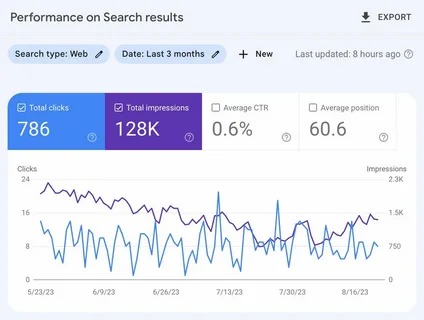
For example, a page may receive many impressions but relatively few clicks. This can suggest that the title or search-result presentation could be improved.
Another page may rank for related searches that are not fully covered in its content. Expanding the page around those relevant topics may improve its usefulness.
Avoid Deleting Content Too Quickly
Old or low-performing pages are not automatically useless.
Before deleting a page, consider:
- Does it have backlinks?
- Does it receive traffic?
- Is it ranking for useful queries?
- Can the content be improved?
- Does another page already cover the same topic?
If two pages overlap heavily, consolidation may sometimes make more sense than maintaining both separately.
Create an Ongoing SEO Process
Existing websites benefit from continuous monitoring.
A practical process can include:
Audit → Prioritize → Optimize → Monitor → Update
This allows SEO improvements to build over time instead of relying on one large optimization project.
For complex websites, a WordPress SEO expert can help evaluate existing performance, identify technical and content issues, and develop a structured improvement plan.
The goal is not simply to make an old website look optimized. It is to preserve what already works while improving the areas that are limiting its organic growth.

















